
If you manage a website and use Google Search Console, you may have seen a soft 404 error listed under your indexing report. Many website owners see this and do not know what it means or how serious it is.
A soft 404 error is not the same as a regular 404 error. It is more confusing and harder to catch because your page looks like it is working fine. But Google sees it differently. And when Google flags a page as a soft 404, that page can stop showing up in search results.
In this blog, you will learn exactly what a soft 404 is, why it happens, how it affects your SEO, and how to fix it step by step.
What Is a Soft 404 Error?
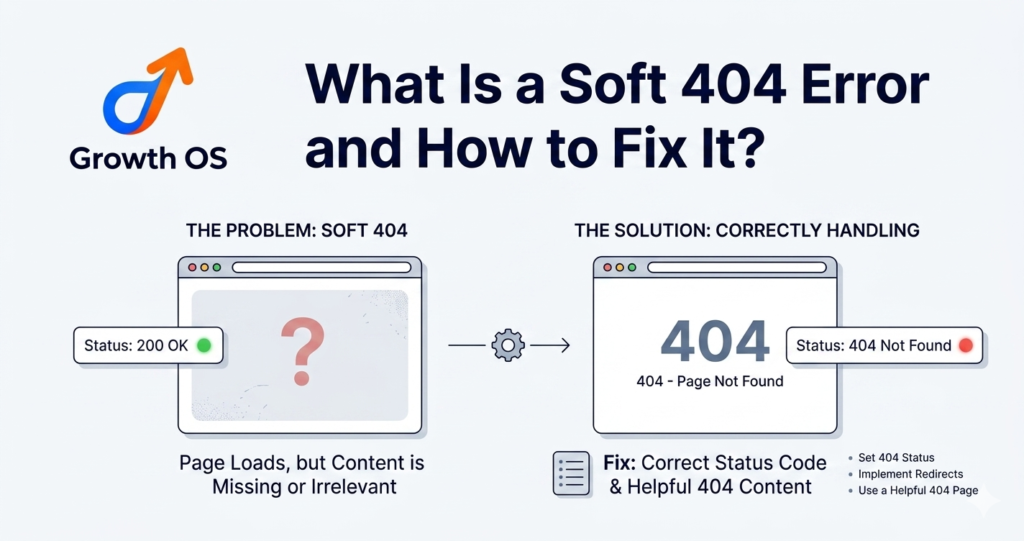
A soft 404 error happens when a page on your website returns a success signal to Google, meaning the server says the page is working fine, but the actual page has no useful content on it. The page looks like it exists but it delivers nothing of value to the visitor.
Google then marks that page as a soft 404 because it believes the page should not exist or should not be shown in search results.
What Does a Regular 404 Error Mean?
A regular 404 error means the page does not exist at all. When someone visits a broken or deleted link, the server sends a clear signal to Google saying this page is not found. Google understands this and removes the page from its index. This is the correct and expected behavior.
How Is a Soft 404 Different From a Regular 404?
The difference is in what the server tells Google.
With a regular 404, the server correctly says the page does not exist. Google gets a clear signal and handles it properly.
With a soft 404, the server says the page is fine and working, but the page itself has no real content. Google arrives expecting to find something useful and finds nothing. This confuses Google because it received a success signal but the page is empty or useless.
Think of it like a shop that is listed as open on Google Maps but when you arrive, the shelves are completely empty. The sign says open but there is nothing inside. That is what a soft 404 feels like to Google.
Why Does a Soft 404 Happen?
Soft 404 errors usually happen for a few common reasons.
A product or article was deleted from the website but the page URL was never properly redirected or removed. The page now loads but shows a message like product not found or page unavailable while still sending a success signal to Google.
A page was created but never filled with any real content. It exists as a live URL but has nothing useful on it.
A backend server error stopped the page from loading its content properly. The page loads but it is blank or broken because the data it needs did not come through.
URL parameters created extra pages on your site that have no unique content. These pages are often duplicates or completely empty but they are still live.
How Does a Soft 404 Hurt Your SEO?
Soft 404 errors can quietly damage your SEO over time. Most website owners do not notice them until rankings have already dropped.
It Wastes Your Crawl Budget
Google has a crawl budget for every website. This means Google only spends a certain amount of time crawling your pages. When your site has soft 404 errors, Google wastes part of that budget crawling pages that have no value. This means your important pages get crawled less often, which can slow down how quickly new content gets indexed.
It Stops Your Page From Getting Indexed
When Google marks a page as a soft 404, it removes that page from the index or stops indexing it altogether. This means the page cannot rank in search results. If that page was supposed to rank for a keyword, that traffic is gone until the issue is fixed.
It also sends a negative quality signal about your website overall. A site with many soft 404 errors looks poorly maintained to Google, which can affect how much trust Google places in your other pages too.
How to Find Soft 404 Errors on Your Website
The easiest way to find soft 404 errors is through Google Search Console.
Open Google Search Console and go to the Indexing section. Click on Pages. Look for a section called Why pages are not indexed. Inside this list, you will see an option called Soft 404. Click on it and you will see all the URLs on your site that Google has flagged as soft 404 errors.
Go through each URL one by one. Open each page in your browser and check what you see. If the page loads but shows an empty page, a not found message, or has no real content, that is your soft 404.
You can also use a free tool like Microsoft Clarity or Screaming Frog to crawl your site and look for pages with very little content. These tools will flag low content pages that are likely causing soft 404 issues.
How to Fix a Soft 404 Error
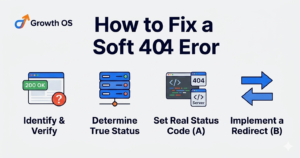
The right fix depends on the situation. Here are the four most common cases and what to do in each one.
If the Page No Longer Exists
If the page has been deleted and you do not plan to bring it back, you need to send the correct signal to Google. Set the page to return a proper 404 Not Found status code or a 410 Gone status code. A 410 tells Google this page has been permanently removed. This stops Google from wasting crawl budget on it and clears the soft 404 from your Search Console report.
If the Page Has Moved to a New URL
If the content from that page now lives at a different URL, set up a 301 redirect from the old URL to the new one. A 301 redirect tells Google and visitors that the page has permanently moved. Google will transfer any value the old page had to the new URL and stop flagging it as a soft 404.
If the Page Exists but Has Very Little Content
Sometimes a page is live but it barely has any useful content on it. Google sees this as a soft 404 because the page does not offer enough value. In this case, the fix is to improve the content. Add proper text, answer a question the user might have, and make sure the page genuinely helps someone who lands on it. Once the page has real and useful content, Google will stop flagging it.
If You Want to Keep the Page but Not Index It
Sometimes you have a page that needs to exist, for example a thank you page or a filter page, but it has no real content worth indexing. In this case, add a noindex tag to the page. This tells Google not to include the page in search results and stops it from appearing as a soft 404 in your report.
How to Check If Your Fix Worked
After making your fixes, go back to Google Search Console. Find the soft 404 URLs you fixed and use the Validate Fix option. This tells Google to re-crawl those pages and check if the issue has been resolved.
Google usually takes a few days to a few weeks to re-crawl and update the status depending on how often it crawls your site. Keep checking the Indexing report every week to see if the soft 404 count is going down.
If you added a 301 redirect, test it by typing the old URL into your browser and checking that it takes you to the correct new page. If you set a noindex tag, use Google Search Console’s URL Inspection tool to confirm the tag is being read correctly.
Frequently Asked Questions
What is a soft 404 error?
A soft 404 error happens when a page on your website loads and sends a success signal to Google but the page itself has no real content. Google sees the page as empty or useless and marks it as a soft 404. This means the page will not appear in search results.
Is a soft 404 bad for SEO?
Yes. Soft 404 errors waste your crawl budget, stop affected pages from being indexed, and send a low quality signal about your website to Google. If left unfixed, they can quietly reduce your organic traffic over time.
How do I find soft 404 errors?
Go to Google Search Console, open the Indexing report, click on Pages, and look under the Why pages are not indexed section. You will find a Soft 404 category listing all the affected URLs on your site.
What is the difference between a soft 404 and a hard 404?
A hard 404 means the page does not exist and the server correctly tells Google with a 404 Not Found status code. A soft 404 means the page appears to exist because the server sends a 200 OK signal, but the page has no real content. The hard 404 is handled correctly. The soft 404 confuses Google.
How do I fix a soft 404?
The fix depends on the situation. If the page is gone, return a proper 404 or 410 status. If the content moved, set up a 301 redirect. If the page has thin content, improve it. If the page should not be indexed, add a noindex tag.
Can a soft 404 come back after fixing it?
Yes. Soft 404 errors can come back if new pages are created without proper content, if products or posts are deleted without redirects, or if server errors cause pages to load without their content. Running a monthly check in Google Search Console helps you catch new soft 404 errors before they build up.
Conclusion
A soft 404 error is one of those technical SEO problems that can go unnoticed for a long time. Your website looks fine on the surface but Google is quietly ignoring pages that could be driving traffic to you.
The fix is not complicated. Find the affected pages in Google Search Console, understand why each one is flagged, and apply the right solution. Either remove the page properly, redirect it, improve the content, or add a noindex tag.
Once you clean up your soft 404 errors, Google can crawl your site more efficiently, index your important pages faster, and trust your website more. These are small technical fixes that lead to real improvements in your SEO over time.